To-dos that know your day.

Dayslot is a calm to-do and reminders app with your calendar built in. Meetings and to-dos sit side by side, any task can get its own slot in the day, and you stop copying things from one app to the other.

Coming soon to iPhone, iPad & Mac

With Apple Watch and widgets. Made by Applicure in Austria.

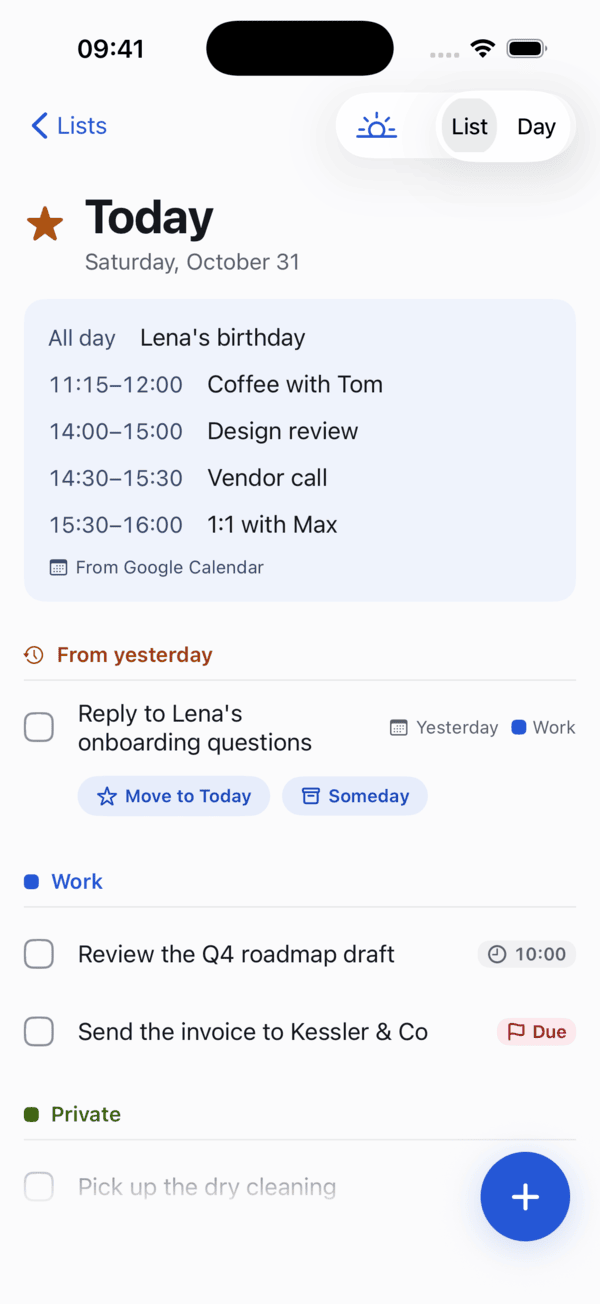
Dayslot's Today screen on iPhone: two meetings at the top, then to-dos grouped by list.
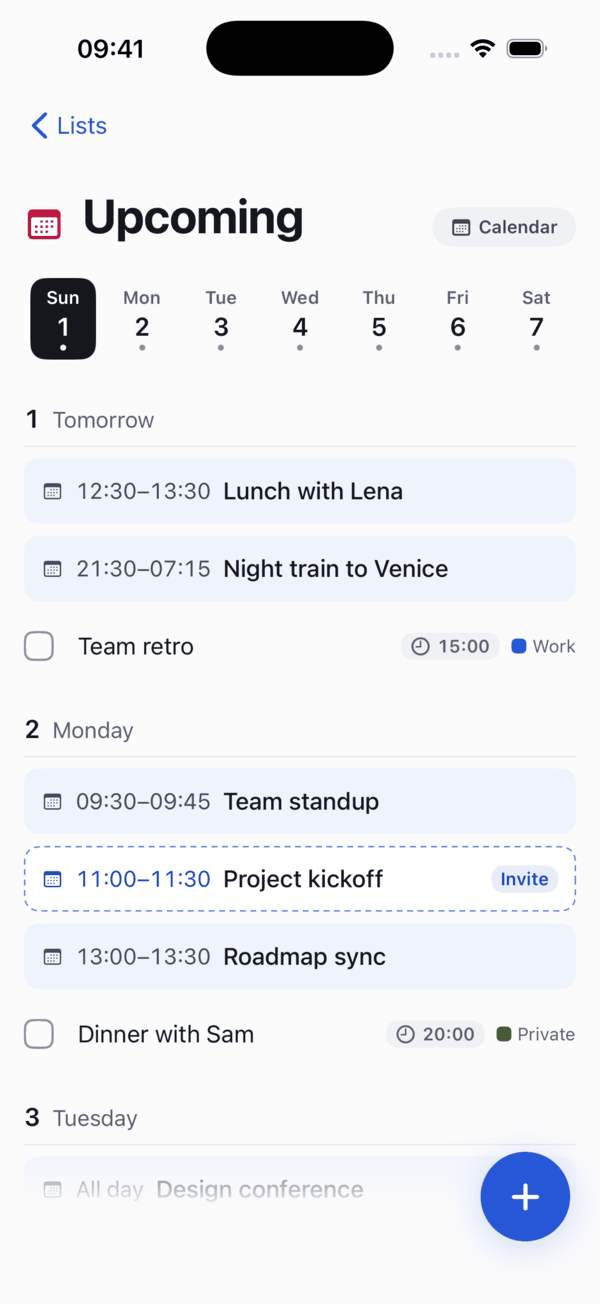
Dayslot's Upcoming screen: a week strip and the coming days with events, an invite and a time block.

Type it the way you’d say it.

Write a to-do in plain words. Dayslot picks out the day, time, list and reminder while you type, and shows what it understood before anything is saved.

English, German, French, Spanish and Italian, including Austrian forms like “Jänner” and “halb neun”. Where Apple Intelligence is available, this happens on your device.

CancelNew To-DoAdd

Call tax advisor tomorrow 9am #Work

Understood as

  • Tomorrow
  • 9:00 AM
  • Work
  • Reminder 8:45 AM
  • Calendar block 9:00–9:30

Tasks and time, finally in one place.

Your calendar stays in Google. Dayslot reads it, writes to it when you ask, and keeps your to-dos right next to it.

Today screen: meetings from the calendar, leftovers from yesterday, then to-dos by list.

Your day on one page.

Today shows your meetings at the top and your to-dos below, grouped by list, with a quiet This evening section at the end.

  • Leftovers from yesterday wait for a decision instead of rolling over silently.
  • Times, deadlines and repeats appear as small chips, not clutter.
  • An optional morning review: Today, Later or Done, one item at a time.
Upcoming screen: a week strip, then each day with events, a dashed invite and a time block.

The week ahead, day by day.

Upcoming lays out every day with events, invites, time blocks and to-dos together, so you can see where a task actually fits.

  • Invites have a dashed outline. Accept, maybe or decline right there.
  • Give a to-do a time and it can block that slot in Google Calendar.
  • Deadlines get a Due chip and stand out once they’re overdue.
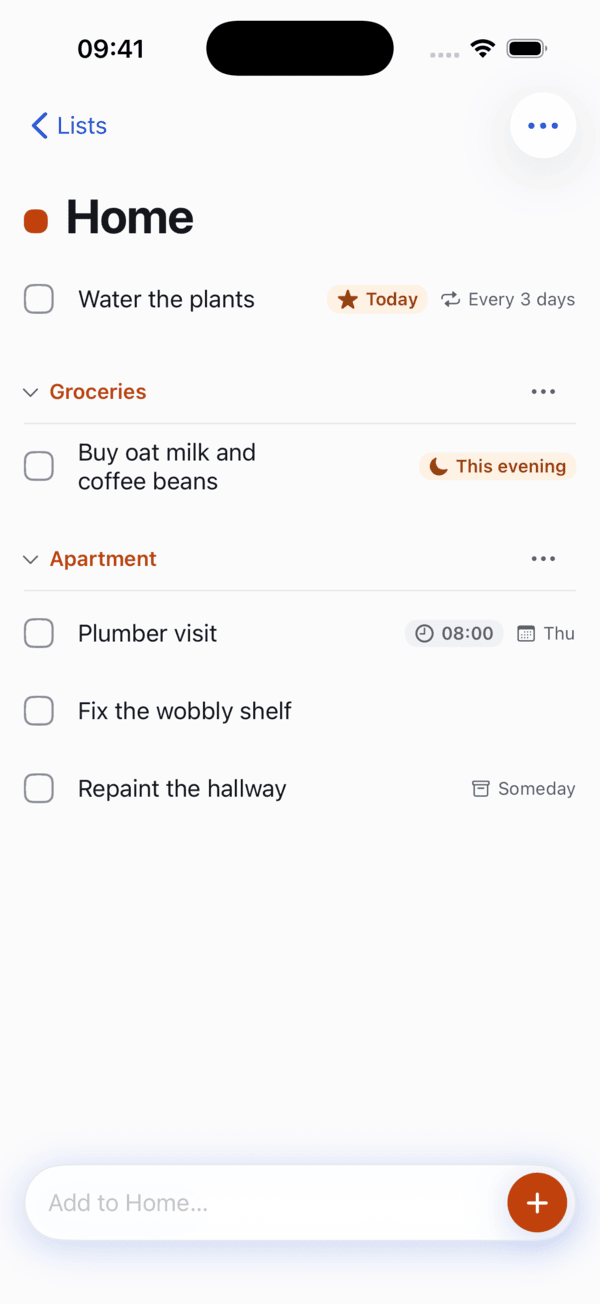
A list called Home with headings for Groceries and Apartment.

Lists for every part of your life.

Work, home, a trip: make as many lists as you like, give each a colour and use headings to group what belongs together.

  • Share a list with your household or team, with view or edit rights.
  • Assign to-dos, comment, and see who added or finished what.
  • Choose per list which activity is worth a notification.

Reminders you can answer

Done, +1 hour, This evening or Tomorrow, straight from the Lock Screen or your watch.

Time blocking

Drag a to-do onto a free slot. Dayslot creates the calendar event and keeps the two in sync.

A real calendar

Day, 3 days and month views, with your to-dos in the same grid as your meetings.

Works offline

Everything happens on the device first and syncs when you’re back online.

Siri and Shortcuts

Add a to-do or ask what’s next without opening the app.

Bring your Reminders

Import your lists from Apple Reminders when you start.

On every Apple device you use.

One purchase covers iPhone, iPad and Mac, and your lists stay in sync between them. Apple Watch and widgets keep the day within a glance.

iPadSidebar, list and details side by side.
MacA week planner with your unscheduled to-dos next to it.
Apple WatchTick off to-dos and answer reminders.
WidgetsProgress and what’s next, on the Home and Lock Screen.

Illustrations. The iPad, Mac, Watch and widget versions are still being built.

Your day stays yours.

A to-do list knows a lot about you. Dayslot is built to know as little as it can.

  • Hosted in the EU

    Sync runs on our own servers in the European Union, operated by Applicure.

  • Calendar access stays on your device

    Your Google sign-in is kept in your device’s Keychain and never stored on our servers.

  • No ads, no trackers

    No advertising, no analytics SDKs, no selling of data. This website sets no cookies either.

  • On-device first

    Quick add is understood on your device where possible. The cloud fallback only sees the sentence you typed.

Free, with an optional Pro plan.

Dayslot is free to download and useful on its own for as long as you like. Pro adds AI help and calendar power for people who plan a lot.

Dayslot

Free

  • Unlimited to-dos, lists and headings
  • Quick add in plain language
  • Reminders with Done, snooze and Tomorrow
  • Your Google Calendar in Today, Upcoming and the calendar
  • Widgets, dark mode, joining shared lists

Dayslot Pro

Optional subscription

  • Time blocking and replying to invites
  • Plan my day: fits your to-dos into free time
  • Brain dump: one paragraph in, separate to-dos out
  • Creating shared lists, location reminders
  • Several Google accounts and calendars

Prices will be announced at launch.

Coming soon.

Dayslot is in development at Applicure. It will arrive on iPhone, iPad and Mac, with Apple Watch and widgets.

Coming soon to iPhone, iPad & Mac